
Open source · BSD-3-Clause · self-hosted
Your own Tailscale control server, with a real admin panel.
Add a machine, grant access, send traffic through a chosen node —
no editing policy.hujson, no SSH into nodes.
Why
The panel does not replace headscale and does not proxy traffic. It takes over the part that is otherwise done by hand — in the CLI and in the policy file.
| Task | With NodeRoost | Without the panel |
|---|---|---|
| Granting access | a “who → where → port” rule, by clicking | edit policy.hujson by hand |
| Isolating personal devices | devices never see each other | yours to get right in the ACL |
| A subnet behind a node | a button on the server card | approve-routes by node ID in the CLI |
| Traffic to one destination | name the domain — the panel tracks it | pick the CIDR, watch for the IP changing |
| Applying a route on the node | the agent applies it | SSH into every machine |
| Internet egress | every device gets its own list of gateways | the exit node is open to anyone the ACL allows |
| Who is online | history and Telegram alerts | nodes list — this moment only |
| Onboarding a machine | a key and a ready command for the OS | make a key in the CLI, dictate the command |
| Where a server sits | a country flag from its public address | remember it yourself or go look it up |
| Backups | a scheduled snapshot, verified | copy the sqlite file yourself |
| A mistake in the rules | rollback to the last working version | edit the file and apply it again |
Use cases
Machines find each other wherever they sit — cloud, office, home, behind someone else's NAT. No public address and no port forwarding needed, and you decide who talks to whom.
The office and the warehouse start seeing each other's networks. Put one node on each side, it advertises its subnet, you approve it — then rules decide who may cross. Neither side needs a static address from its ISP.
Carrier-grade NAT, a router you don't own, nobody to ask for a port forward. Put a node on that machine and it shows up on the network. You open access to your laptop only, on one port only — no TeamViewer, no reverse tunnel.
The database, the IPMI board, the cluster API and the router's web UI live on tailnet addresses. Nothing is published, no bastion host needed, and you grant a port rather than the whole machine.
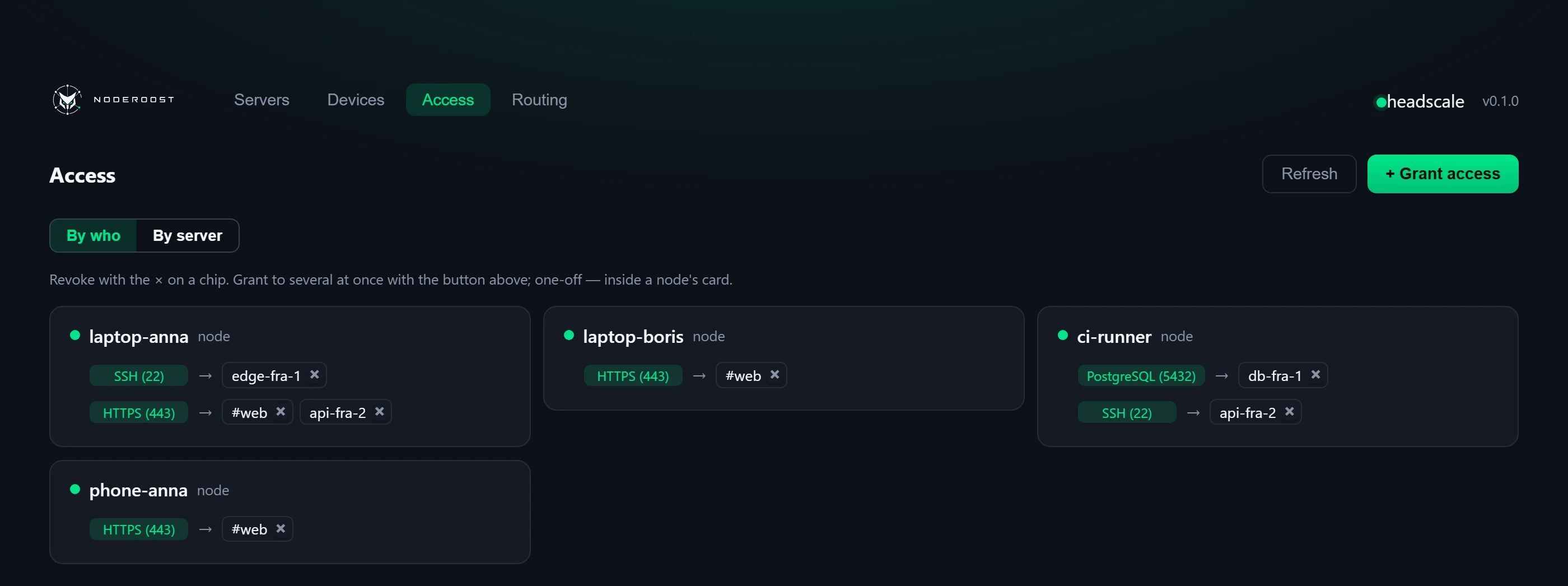
Access is granted to a port, not to the whole machine: give them 5432 and they see the database and nothing else — no SSH, no admin panel. It can go to a role — a group of servers: add another one to it and it shows up for them on its own. Job done — delete their device, and the access is gone everywhere at once.
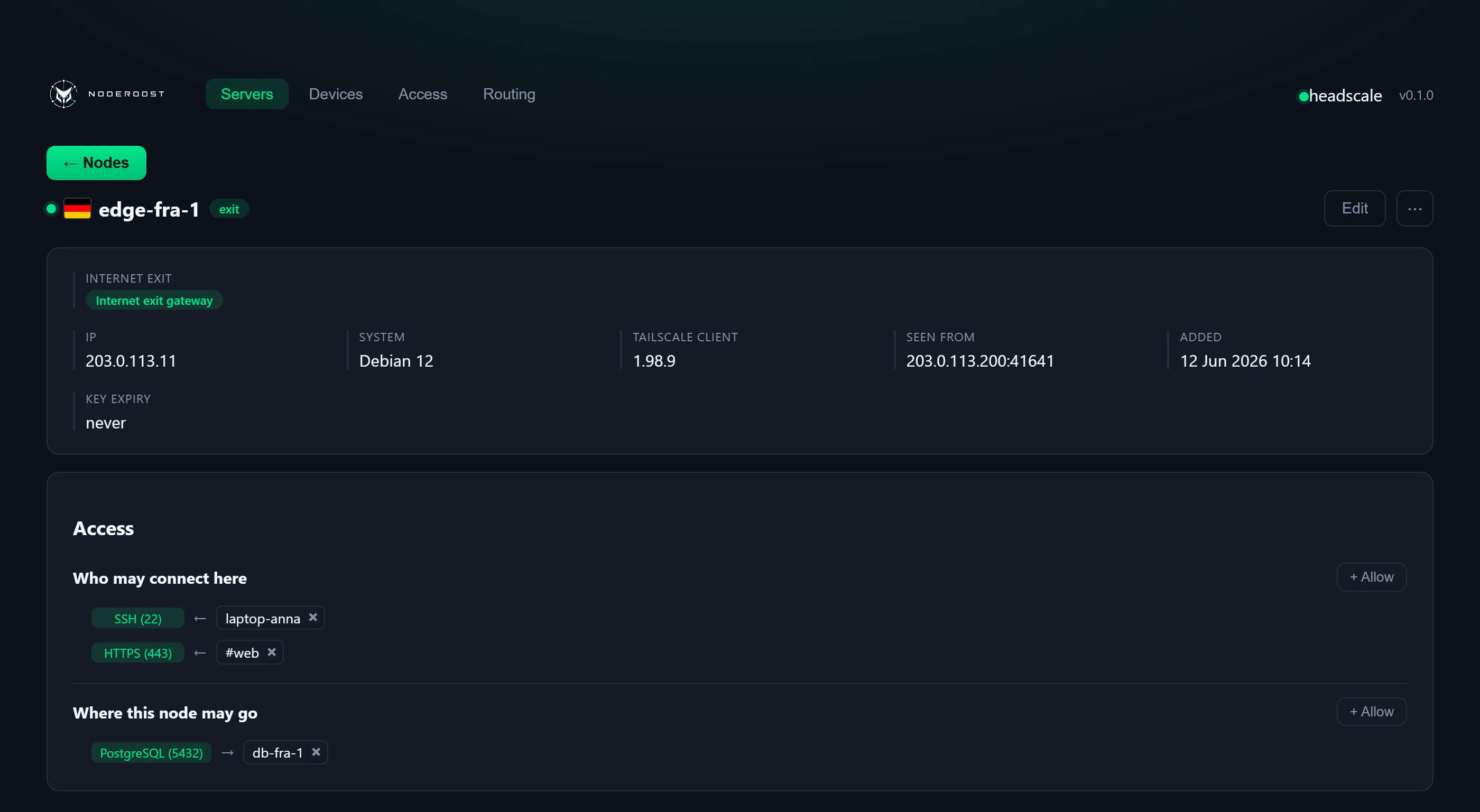
Mark a server as a gateway and the traffic of whoever you allowed leaves for the internet from its address. People switch between gateways themselves in the Tailscale client, but only ever see the ones you gave them.
The server reaches the internet through a node you pick, so its requests arrive from that node's address — from the country a partner expects, say. One tick on the server's card turns it on, another turns it off.
Normally a server vanishes when its traffic is tunnelled: replies to incoming connections leave through the tunnel and never arrive, so SSH drops and the site stops answering. Not here — a reply goes back the way the request came, and the server stays reachable at its own address.
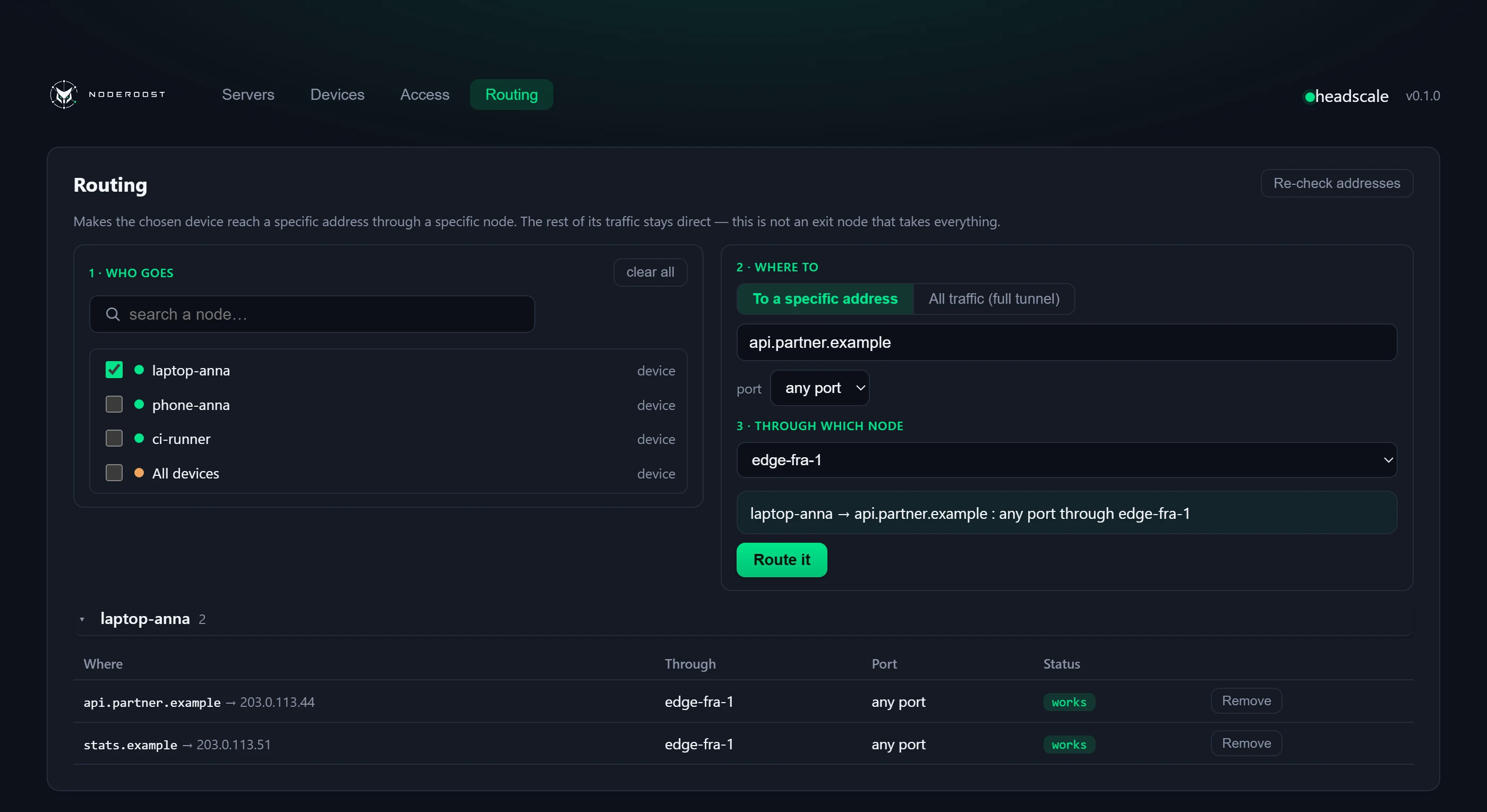
The partner allows one IP only, and you need to reach them from a laptop. In the panel you say: for this address, go through edge-1 — the server whose IP is on their list. The requests arrive from edge-1, while the rest of the laptop's traffic still goes direct.
No public IP, no dynamic DNS, no port forwarding on the router. Put a node on the home server and reach it from anywhere — your phone, your laptop, your work machine — exactly as you would from the sofa.
The machines sit with different providers, in different data centres, with no network in common: the runner writes to the database, the backup job ships to storage, the app talks to the next data centre.
That used to mean a port open to the world and an IP allowlist on a firewall that broke on every migration. Now the machines see each other directly and the access is one rule in the panel.
A normal VPN swallows all your traffic. Here the laptop reaches the internet directly and fast, and only what you listed goes through the network: office subnets, specific services, individual addresses.
You moved to another data centre, the provider handed out a new address, the machine went from the office to someone's home. On the tailnet it keeps its address and its name, so rules, scripts and bookmarks need no editing.
No .ovpn attachments. A person gets a single-use key and
one command for their OS — a minute later they are on the network.
Revoking means deleting a device, not reissuing configs for
everyone else.
While the server answers on port 22, strangers' bots pick at it around the clock. With a node on it, that port can be closed on the public interface for good — you come in on the network address instead, by a rule from the panel.
There is nothing left outside to knock on, and the list of who may come in sits in one place and changes by clicking.
The provider blocked the port, the public address is under attack, somebody rewrote the firewall rules, the corporate VPN is down — and you need to get in now. A node needs no more than outbound access to stay in touch, so the machine is still reachable when nothing gets to it from outside.
The panel is not part of the connection: even while it is unavailable, the sessions already running carry on.
An IPMI board, cameras, a printer, a managed switch, an old NAS — nothing can be installed on them, and you still have to reach them. Put a node on any machine in that network, it advertises the subnet, you approve it, and you work with all of it on internal addresses as if you were sitting next to it.
Access is granted the same way as everywhere else: to whom, and on which port.
Model
headscale knows nothing about this — to it every machine is just a node.
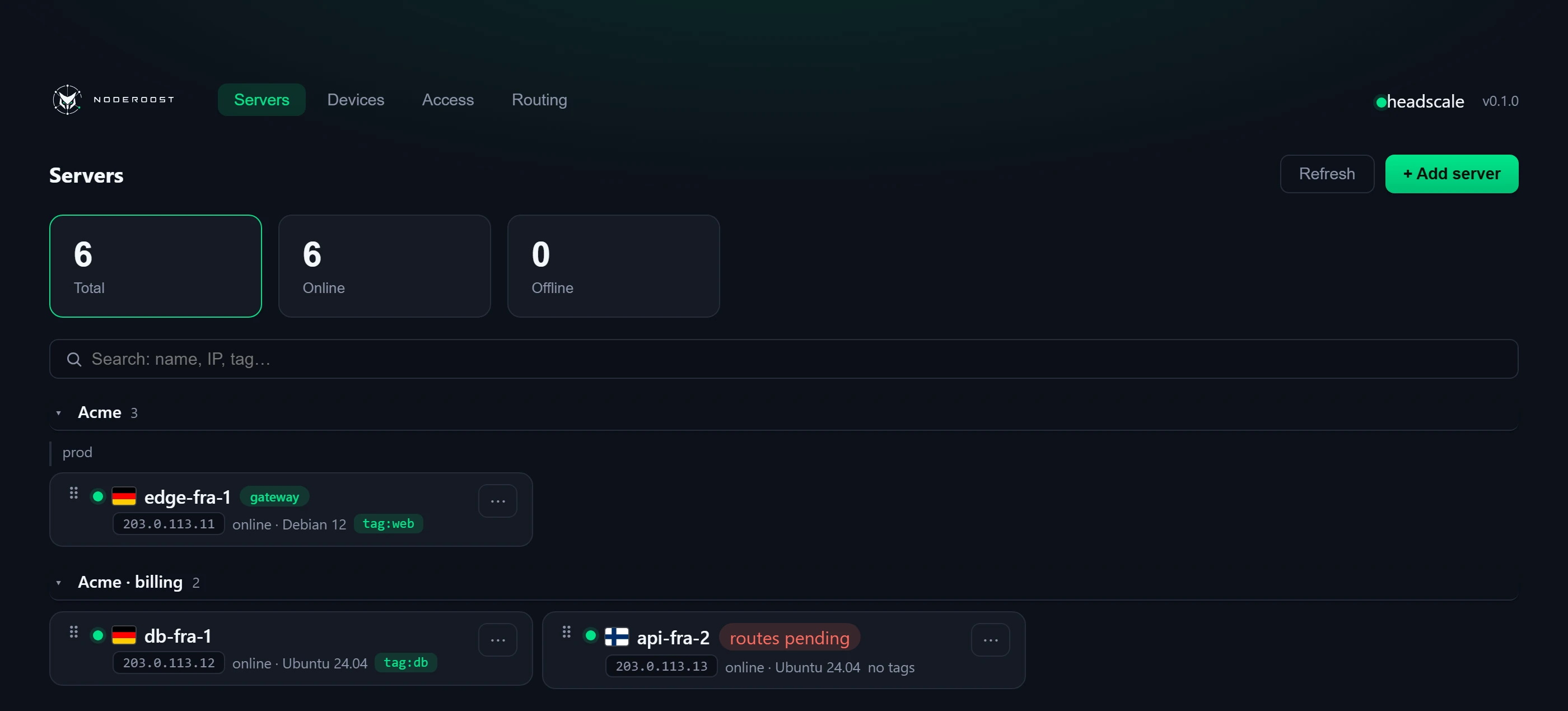
The split into servers and devices is ours; it lives in the panel's database.
The difference is one thing: access can be opened to a server, never to a
device.
So servers reach each other too, while devices cannot see each other at all.
Server
Device
Interface
Four screens where nearly everything happens.
Architecture
The panel reaches headscale over an internal Docker network — the
management API is never exposed.
The only thing open to the world is what Tailscale clients need: joining
and fetching the network map.
Install
The panel, Postgres and headscale itself come up from one file. A reverse proxy terminates TLS and keeps the panel behind an address allowlist.
# 1. get the repository
git clone https://github.com/mihsergeev/NodeRoost.git
cd NodeRoost

# 2. domains, secrets, allowlisted addresses
cp .env.example .env && $EDITOR .env

# 3. bring it up
docker compose up -d

# 4. enrol a node — the panel hands you this command
curl -fsSL https://control.example.com/agent/<token>/setup | sh
databaseghcr.io/mihsergeev/noderoost-backend and -frontendSecurity
Everything below works from the first start — nothing to switch on or configure separately.
 NodeRoost